

Making arithmetic engaging for children is a challenge that parents and teachers face every single day. Most educational math apps fall into two traps. Either they are too dry and feel like digital worksheets, or they are so cluttered with animations and distractions that they dilute the actual learning process. When I decided to build Math Magic: Learn & Play, my goal was to create a native Android game that successfully blends real-time play, voice commands, and a parent-managed reward system that bridges the digital and physical worlds.
## The Spark and Planning the App
The idea for Math Magic came from observing how children interact with screens. Kids respond incredibly well to streaks, high scores, and achievement systems. However, virtual points in a game rarely translate to anything meaningful in real life. I realized that if kids could earn points and redeem them for real-world rewards—like half an hour of gaming time or a trip to get ice cream—it would build a much stronger connection to learning.
I validated this concept by talking directly with parents. They loved the idea of a self-sustaining motivation loop but emphasized that it had to be simple for them to manage. That conversation shaped the core architecture: a vibrant, arcade-themed game for the kids, and a secure dashboard for parents to handle the reward economy.
## Selecting the Right Tools
To keep the gameplay incredibly responsive, I chose a native Android development stack. The core logic of the app is written in Java, targeting Android 15 to ensure compatibility with the latest devices while maintaining support back to older versions.
I avoided web wrappers or cross-platform frameworks to ensure that the voice engine and animations ran at a solid sixty frames per second without battery drain. For local storage, rather than setting up a complex, internet-dependent database, I implemented a local ProfileManager that handles everything offline. It serializes player profiles and progress reports into simple JSON strings, saving them securely to the device’s sandbox. This ensures the app is fast, offline-friendly, and respects user privacy.
## Crafting the Visuals and Interactions
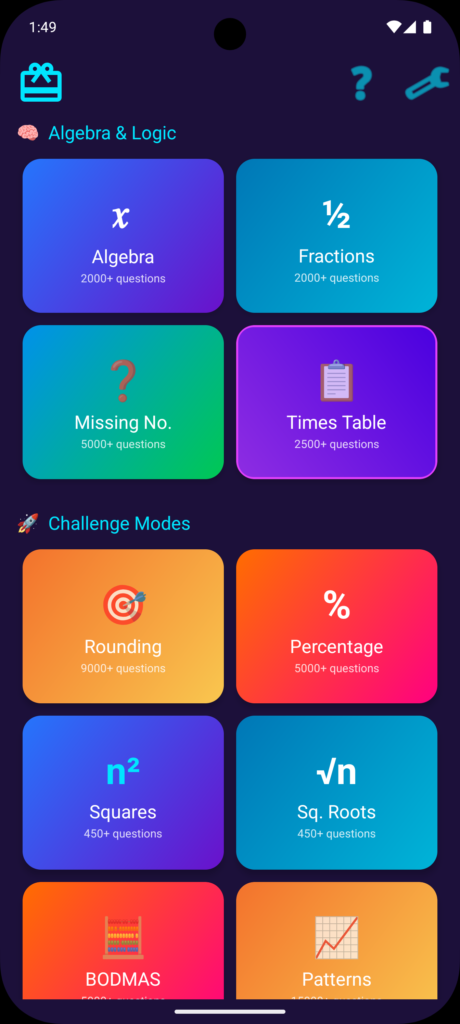
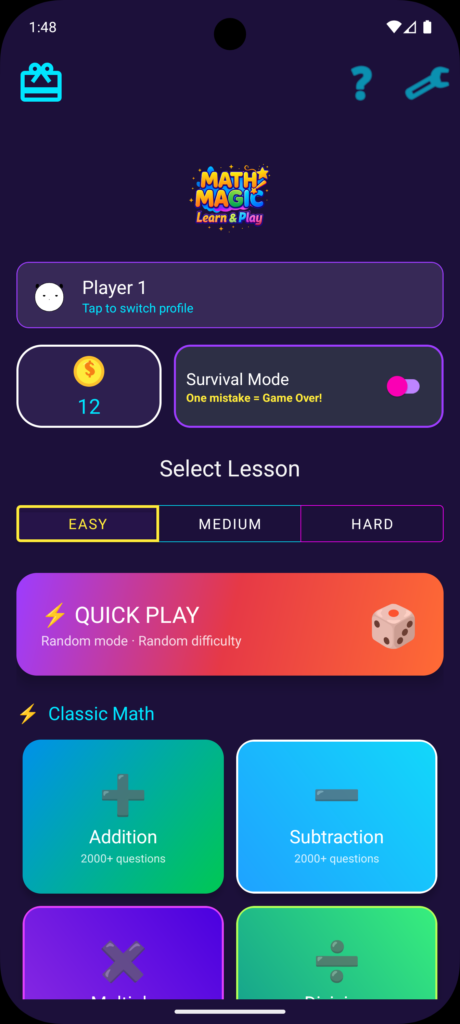
Most kids’ games rely on bright primary colors and cartoon animations, but I wanted something that felt more like a classic retro arcade. We designed a dark purple workspace highlighted by glowing neon borders.
To make the app feel personal, I created a dynamic theme engine. Each player selects a profile color—such as neon magenta or electric cyan—and the card borders, selector highlights, and avatar outlines across the entire interface dynamically update to match. This small touch makes children feel like they have ownership over their dashboard.
Integrating the voice engine was one of the most rewarding parts of development. I utilized the Android SpeechRecognizer to allow hands-free play. When a child sees a math problem, they can tap the microphone icon and speak their answer. The app processes the voice input locally on the device, extracting the numbers and checking the answer instantly. Processing the speech locally means there is no network lag, and no audio data is ever transmitted to a server.
## Overcoming Obstacles
Building the app came with its share of hurdles. One of the main challenges was optimizing dashboard performance for families with multiple children. Initially, loading charts and progress breakdowns for multiple profiles caused noticeable screen stuttering. I solved this by designing a lightweight horizontal recycler view at the top of the Parent Corner. This list acts as a quick filter, only loading and drawing the graphs when a parent clicks on a specific child’s card.
We also had to ensure the app met the strict guidelines of the Google Play Store, particularly for apps targeted at children. When Google Play Console flagged the requirement for an explicit Advertising ID permission, I updated our configuration to declare the permission and ensure our data safety forms accurately represented our local data policies.
## Looking Ahead
Launching the app was just the first milestone. The response from parents has been incredibly encouraging, and I am already planning the next set of features. The future roadmap includes adding multi-device cloud syncing so siblings can share progress across multiple tablets, developing a pet-companion system that grows as the child solves math problems, and adding localized voice engines to support different languages.
## Resources
If you want to check out the app, you can download it from the Google Play Store: https://play.google.com/store/apps/details?id=in.co.onestoptech.mathmagic
You can find more details about our work on the OneStopTech website: https://onestoptech.co.in
To understand how we handle user data and microphone access, you can read our Privacy Policy: https://onestoptech.co.in/math-privacy-policy