

Capturing a child’s interest in mathematics requires more than just digitizing a set of textbook exercises. Math Magic: Learn & Play stands out by introducing a gamified ecosystem where math practice becomes an engaging experience. By combining modern retro-neon aesthetics, on-device voice recognition, and customizable parental settings, Math Magic makes arithmetic practice feel like playing a video game.
Here is a detailed guide to the features that make Math Magic an effective learning tool for families.
## Family Profiles with Personalized Themes
Math Magic is designed to support multiple players in a single household. Instead of sharing a single account or overwriting progress, parents can set up individual profiles for each child.
To give children a sense of personalization, each profile is assigned a unique neon color theme. When a child selects their profile, the entire application interface changes dynamically. The borders of the buttons, cards, and profile avatars glow in their signature color, whether it is neon magenta or electric cyan. This personalization helps children feel ownership over their dashboard and progress.
## A Comprehensive Math Curriculum
The application features a wide range of lessons tailored to children of various skill levels. Standard operations cover addition, subtraction, multiplication, and division. These modes help children build confidence with basic carries, borrowings, times tables, and remainders.
For older kids who need a greater challenge, Math Magic includes ten advanced lesson modes. These lessons introduce topics like rounding numbers to the nearest tens or hundreds, calculating percentages in real-world scenarios, solving squares and square roots, and understanding the order of operations under BODMAS. The app also features Roman numerals and money math, which help kids apply their calculation skills to practical, everyday problems.
## Hands-Free Speech Recognition
One of the most innovative features of Math Magic is the integrated voice command engine. On the gameplay screen, a child can tap the microphone icon and speak their answer out loud.
This speech recognition happens entirely on the local device. The application does not record or upload audio data to the cloud, ensuring total privacy. By encouraging children to verbalize their answers, the app reinforces numerical recall and helps build verbal confidence.
## The Streak and Combo Engine
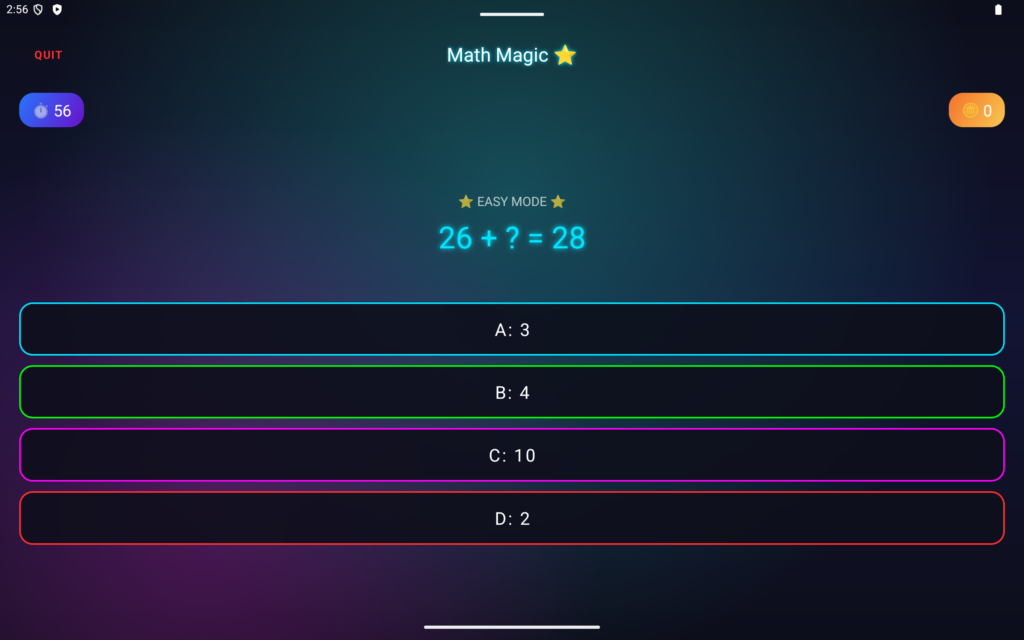
To keep children motivated, the gameplay features a classic arcade-style combo multiplier. Answering questions correctly earns coins, but building a streak unlocks much larger rewards.
For example, answering five questions correctly in a row triggers a Combo Bonus, awarding fifty coins. Keeping that streak alive up to ten correct answers unlocks a Mega Combo, which awards a massive bonus of 144 coins accompanied by a vibrant on-screen coin animation. In standard modes, incorrect answers carry a small coin penalty. This design encourages children to take their time and think carefully rather than guessing at random.
## Custom Rewards and Parent Dashboard
Most educational apps lock rewards behind microtransactions, but Math Magic gives parents complete control over the in-game economy. The Parent Corner is protected by a parental gate and a secure PIN to prevent children from changing the settings.
Inside the dashboard, parents can view detailed performance charts. A pie chart shows the ratio of correct answers to incorrect attempts, while a bar chart displays mastery points across different mathematical operations. Crucially, parents can write custom rewards and set their coin prices. Children can save up their in-game coins to buy coupons for real-life rewards that parents fulfill, such as extra screen time or a special dessert.
## Common Questions
Some parents ask if the application requires an internet connection. Fortunately, Math Magic works entirely offline, meaning player progress is stored locally and speech processing does not use any mobile data.
Others ask if they can adjust the difficulty. The main menu allows players to toggle between easy, medium, and hard settings, or try Survival Mode where a single wrong answer ends the run.
## App Resources
To download the app, visit the Google Play Store page: https://play.google.com/store/apps/details?id=in.co.onestoptech.mathmagic
For updates and more educational games, visit our website: https://onestoptech.co.in
Read our Privacy Policy to see how we keep voice data secure: https://onestoptech.co.in/math-privacy-policy